
OLED Display Module & Text Animations
Project Overview
This project uses a Digicomp ESP32-S3 Dev Board to drive a 0.91-inch OLED Display Module (128x32 Resolution) using the I2C communication protocol.
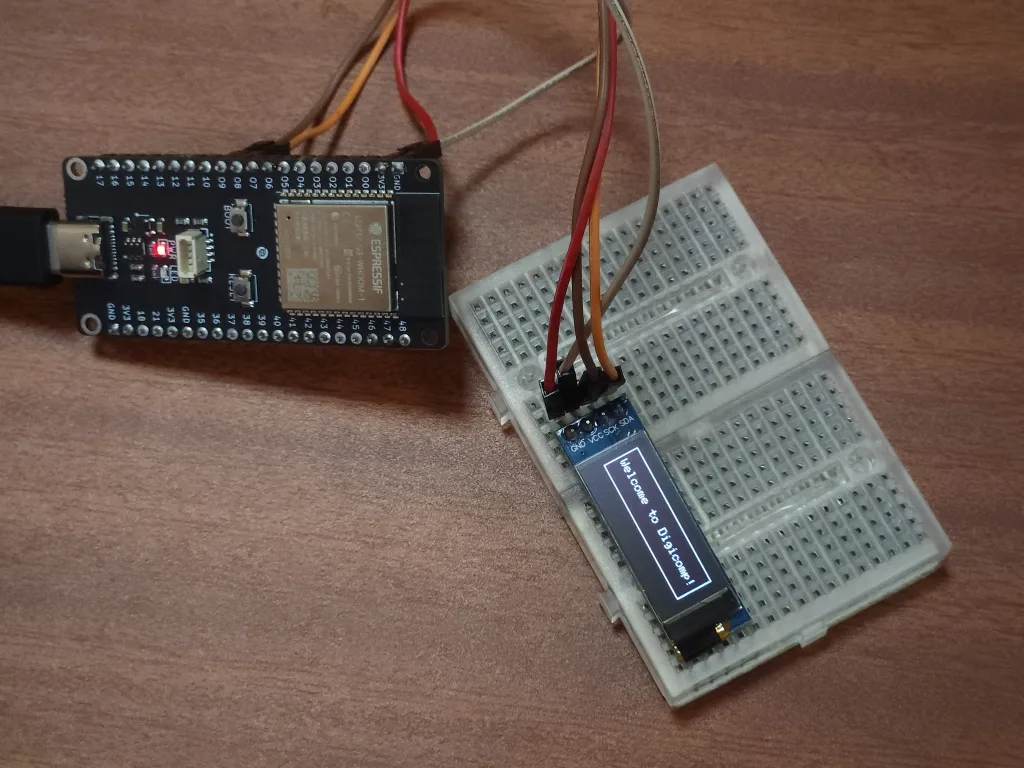
The system continuously renders dynamic text animations on the screen, including:
- Centered Typewriter Animation: Smoothly types out text letter-by-letter, automatically centered within a full-screen dynamic border.
- Shrinking Frame Transition: Shrinks an enclosing border box toward the center to transition smoothly between animation states.
Hardware Components
- Digicomp ESP32-S3 Dev Board
- 0.91" SSD1306 OLED Display (128x32, I2C Interface)
- Jumper Wires (4x Female-to-Male or Female-to-Female depending on setup)
- USB-C Data Cable
- Computer/Laptop with Arduino IDE or PlatformIO
Pin Connections
| OLED Pin Label | ESP32-S3 Dev Board Pin |
|---|---|
| VCC | 3.3V |
| GND | GND |
| SDA | GPIO 8 |
| SCL | GPIO 9 |
Software & Environment Setup
- IDE: Arduino IDE (v2.x or later) / PlatformIO
- Board Manager Package:
esp32by Espressif Systems - Required Arduino Libraries:
Adafruit SSD1306(v2.5.7+)Adafruit GFX Library(v1.11.5+)Wire(Built-in ESP32 I2C Library)
Complete Arduino C++ Program (oled_animation.ino)
cpp
#include <Wire.h>
#include <Adafruit_GFX.h>
#include <Adafruit_SSD1306.h>

#define SCREEN_WIDTH 128
#define SCREEN_HEIGHT 32

// Declaration for SSD1306 OLED via I2C (SDA, SCL)
#define OLED_RESET -1
Adafruit_SSD1306 display(SCREEN_WIDTH, SCREEN_HEIGHT, &Wire, OLED_RESET);

const char textToAnimate[] = "Your Statement!";
int textLen = sizeof(textToAnimate) - 1;

void setup() {
  Serial.begin(115200);

  // Initialize Wire with ESP32-S3 default I2C pins (SDA: 8, SCL: 9)
  Wire.begin(8, 9);

  // 0x3C is standard I2C address for 0.91" OLED displays
  if (!display.begin(SSD1306_SWITCHCAPVCC, 0x3C)) {
    Serial.println(F("SSD1306 allocation failed. Check I2C wiring."));
    for (;;); // Halt execution if display is missing
  }

  display.clearDisplay();
  display.setTextColor(SSD1306_WHITE);
}

void loop() {
  // ----------------------------------------------------
  // ANIMATION 1: Typewriter Effect with Centering
  // ----------------------------------------------------
  display.setTextSize(1); // Standard 5x7 font scaling

  for (int i = 1; i <= textLen; i++) {
    display.clearDisplay();

    // Draw outer frame border
    display.drawRect(0, 0, SCREEN_WIDTH, SCREEN_HEIGHT, SSD1306_WHITE);

    // Build current substring safely (sized to handle full length + null terminator)
    char currentText[sizeof(textToAnimate)];
    strncpy(currentText, textToAnimate, i);
    currentText[i] = '\0';

    // Calculate dynamic bounding box for centering
    int16_t x1, y1;
    uint16_t w, h;
    display.getTextBounds(currentText, 0, 0, &x1, &y1, &w, &h);

    int xPos = (SCREEN_WIDTH - w) / 2;
    int yPos = (SCREEN_HEIGHT - h) / 2;

    display.setCursor(xPos, yPos);
    display.print(currentText);
    display.display();

    delay(120); // Typing delay
  }

  delay(1500); // Hold complete text

  // ----------------------------------------------------
  // ANIMATION 2: Shrinking Box Frame
  // ----------------------------------------------------
  for (int w = SCREEN_WIDTH, h = SCREEN_HEIGHT; w > 0 && h > 0; w -= 8, h -= 2) {
    display.clearDisplay();

    // Render static centered text
    int16_t x1, y1;
    uint16_t tw, th;
    display.getTextBounds(textToAnimate, 0, 0, &x1, &y1, &tw, &th);
    display.setCursor((SCREEN_WIDTH - tw) / 2, (SCREEN_HEIGHT - th) / 2);
    display.print(textToAnimate);

    // Render shrinking surrounding rectangle
    display.drawRect((SCREEN_WIDTH - w) / 2, (SCREEN_HEIGHT - h) / 2, w, h, SSD1306_WHITE);
    display.display();

    delay(20);
  }

  delay(500); // Pause before repeating loop
}
Conclusion
The ESP32-S3 OLED Display Animation System demonstrates reliable real-time graphics rendering on 128 x 32 pixel SSD1306 monochrome displays. By leveraging dynamic layout metrics (getTextBounds), the application ensures flicker-free, properly aligned visual animations suitable for embedded user interfaces and status telemetry displays.
Contributors
 Poojith Nirmal